Xerra Chat for Joomla
The assistant that reads your Joomla articles and answers with the source.
What it does
Your content
What it reads and when
- Connect with Xerra
- One button: log in and pick the assistant. A connection code works too.
- Re-reads on its own
- When you save, publish or delete an article or a category, the change is sent. Change a category and its articles are sent again.
- Whole articles
- Text, category, tags, image and SEO data of public articles, and categories that have a description.
- Only what's public
- Never users, forms, contacts, or unpublished or restricted content.
Show 4 more
In front of visitors
The chat on your website
- Talk to a person
- When it doesn't know the answer, it offers your contacts: WhatsApp, phone, email or your contact page. Taking over a conversation live happens on the platform.
- In three languages
- The package's admin is in Catalan, Spanish and English.
Inside Joomla
What you see
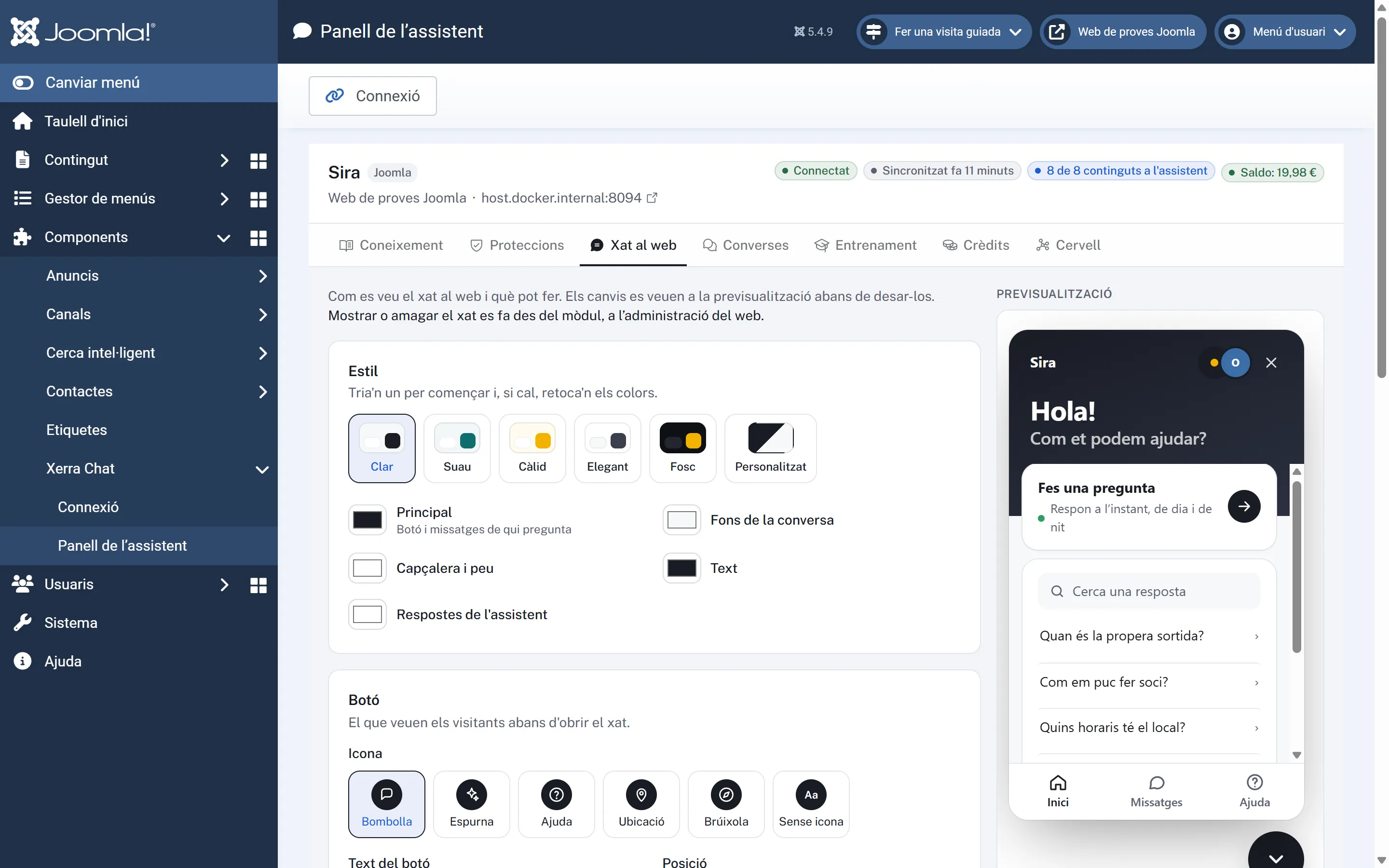
- The assistant panel, in the admin
- Under Components › Xerra Chat: Knowledge, Protections, Website chat with a live preview and starter questions, Conversations, Training, Credits and the Brain. Plus the connection page: status, balance, show or hide the chat, re-read the site and disconnect.
- Joomla updates
- New versions show up in Joomla's update manager.
What it looks like
In the admin
On a phone
The chat on a phone The site on a phone with the chat button
How to install it
- 01
We give it to you
We give it to you when we open your demo, with your assistant already set up.
- 02
Install it in Joomla
Go to System › Install › Extensions and upload the package. The system plugin is enabled automatically.
- 03
Connect with Xerra
Press “Connect with Xerra”, log in and pick the assistant. If needed, a connection code works too.
Requirements
- Joomla
- 4.4+
- PHP
- 8.1+
- Plugin version
- 1.1.0
- Tested with
- Joomla 5.4.9
- Also
- Needs cURL or allow_url_fopen.
Questions about Xerra Chat for Joomla
Does it work with multilingual sites?
Yes: each article is sent with its Joomla language tag.
What does the package install?
A component and a system plugin, which go together. The plugin is enabled automatically.
Does it work with Joomla 4?
It's built for Joomla 5 and tested on 5.4.9. It supports 4.4 and later.
I imported articles straight into the database.
Changes that bypass Joomla's events, such as imports or batch moves, aren't sent automatically: read the site again afterwards.
Why is there no Options screen?
Because Joomla's options screen would wipe the connection.